There is a way in TotalMD to see if you have entered charges in the ledger for scheduled appointments. . Here is a link to a YouTube showing this process and the instructions are below.
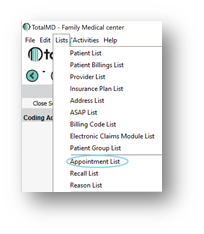
You can go to Appointment List from the List Menu:
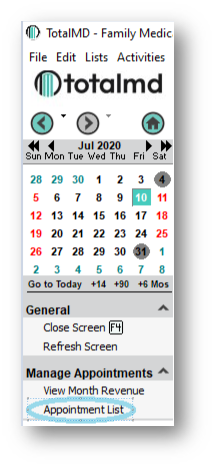
You can also access the Appointment List through the Scheduler:
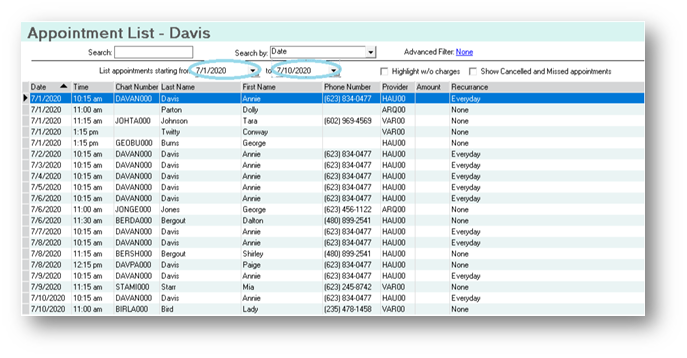
After choosing the Appointment List, you will see the Appointment List screen. You will then want to choose your date range of appointments that you wish to see:
Once you have a list of appointments, to see the appointments that do not have charges attached to them, you will click the Highlight w/o charges box:
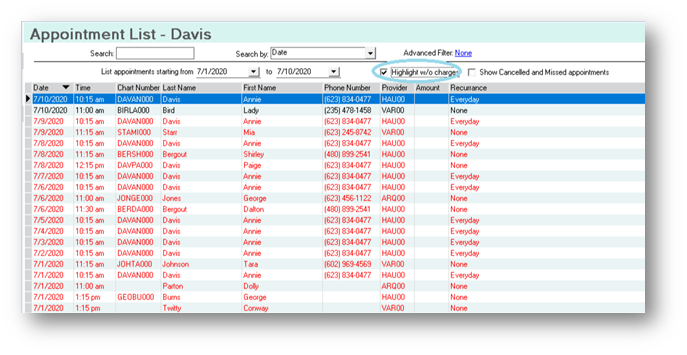
You now will see any appointments where there are no ledger charges entered highlighted in red.
If you have questions regarding this functionality of TotalMD, please contact our support or training departments at 800-613-7597 Option 2 for Support or Option 3 for Training. If you would like a printable copy of this article, please contact Training at Option 3.